 MySimpleVideo
Video editing without the hassle.
On your own computer.
MySimpleVideo is a lightweight video editor for Windows — multi-track timeline, effects, transitions, chroma key, background removal, batch operations and 4K export. No account, no cloud, no uploading files anywhere. You never pay for any tokens or subscriptions.
Version 0.27.0 • Windows 10/11 (64-bit) • no sign-up, no account • internet only to check for updates
 REC
RECEverything you need to edit
From simple cuts to background removal and motion tracking — no paid add-ons, subscriptions or tokens.
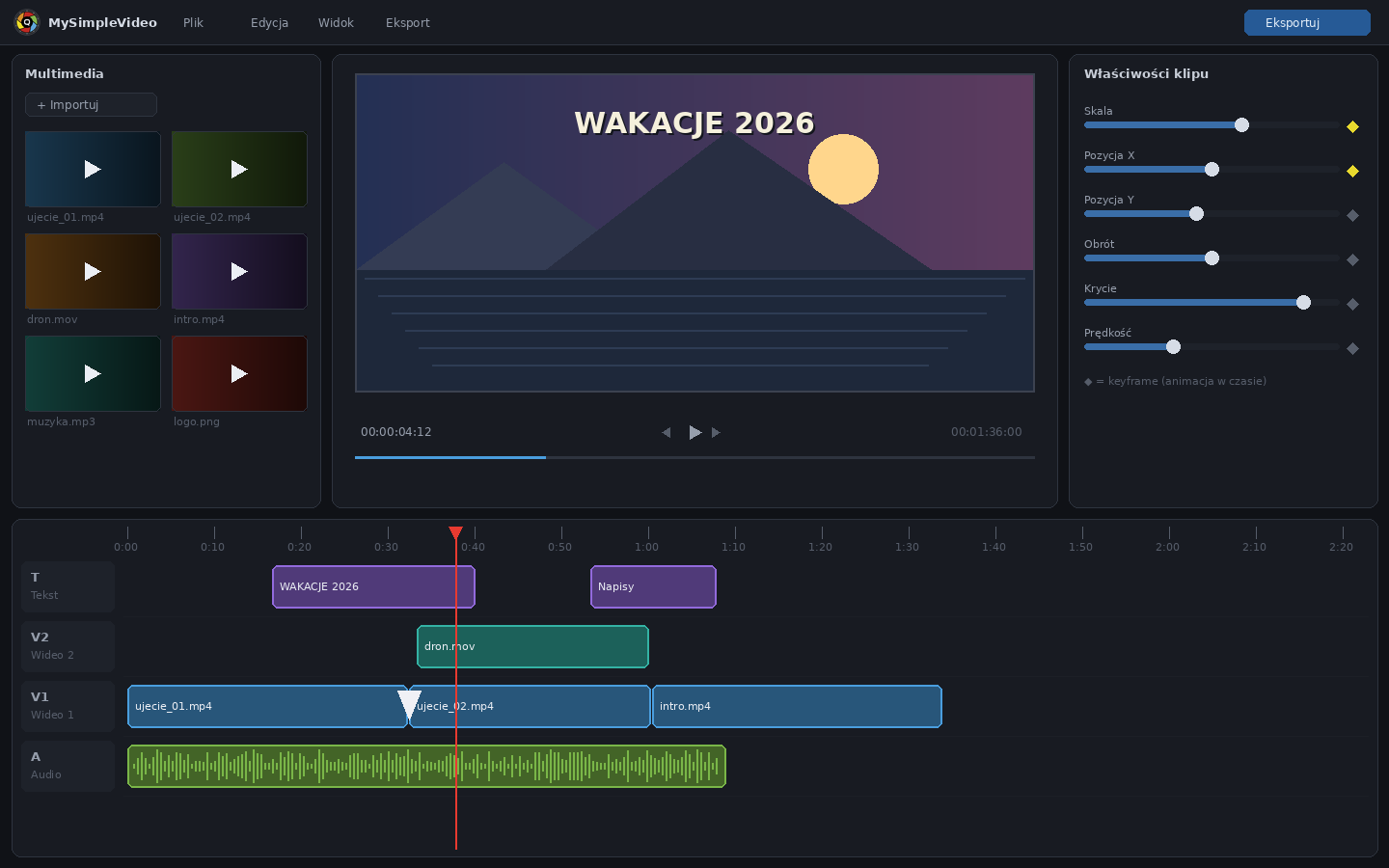
Multi-track timeline
Separate video, audio and text tracks. Trim, split, insert at playhead, overlays, freeze frame, compound clips and full undo/redo.
Background removal without a green screen
The app detects the person in the frame and removes the background — no green screen and no paying for any tokens. Edge trim and softness sliders. Plus classic chroma key with a color picker and spill suppression.
DVD import
Point at any file in VIDEO_TS and the app joins the whole title into one clip, deinterlaces it and fixes the aspect ratio. Old family recordings on discs come back to the edit.
Refresh old footage
Denoise, sharpen and upscale to 1080p for DVD and tape recordings — with a "before / after" sample on a few seconds before you run the whole movie.
Cinematic filters, effects and transitions
27 color filters — from subtle (Cinema, Vintage, Pastel, Golden hour) to bold (Neon, VHS, Comic) — with a strength slider. Your own LUTs from .cube files with a strength slider, RGB curves, 25 motion effects, overlays, image stabilization and a dozen transitions.
Widgets that count by themselves
Stopwatch, a 3, 2, 1 countdown with beeps, an analog clock, progress in 14 styles and a number counter (“0 → $12,500”). Drop a tile on the timeline and the widget counts from its place — with all the fonts, outlines and animations of captions.
Speedometer from the display in your video
Mark the digits of the speed display from your camera — the app reads them frame by frame and moves an analog needle. Plus trip stats: distance, top and average speed, time and a live chart.
For YouTube creators
An animated “Subscribe” button with a cursor and bell, chapters with ready timestamps for your video description, a checklist that ticks itself off and a scoreboard with a match clock.
Text that looks good by itself
A dozen title presets: header, caption, Neon, Gold, Cyberpunk, Retro 3D, Elegant, YouTube, TikTok, Subscribe, hashtag. Every font on your system, outlines, shadows, gradients and in/out animations.
Stickers, shapes and backgrounds
Hundreds of stickers in 11 categories (emotions, gestures, arrows, awards, nature, sport, tech…), shapes — arrows, speech bubbles, stars, hearts, bars, rings — and backgrounds: gradients, aurora, sunset, cosmos, rainbow. Every object can be animated and pinned to motion in the frame.
Screen and voice-over recording
Record the screen with system audio (hardware-accelerated, up to 1440p) or a voice-over with countdown — the recording lands on the timeline and in the project folder.
Proper audio
Multi-track mix, fade in/out, noise reduction, de-esser, reverb and effects, loudness normalization, dB meter with clipping warning.
Keyframes and motion tracking
Animate position, scale, rotation and opacity over time. Pick a point in the preview and text or graphics follow the object. Face censoring that tracks by itself.
Export for YouTube and Shorts
MP4 H.264 or AV1 in 1080p, 2K or 4K, landscape or portrait. Four quality levels with a hint of how much smaller the file gets. Hardware encoding — no endless waiting.
Nothing gets lost
Emergency save every 30 s, a prompt before closing an unsaved project, crash recovery. Recordings and ripped discs live in the project folder — move the folder, move everything.
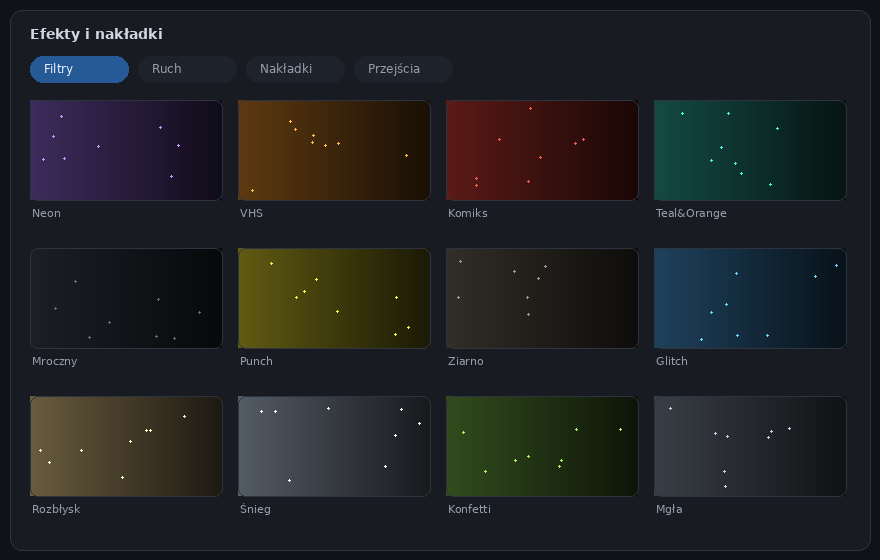
Effects you click like tiles
All filters, motion effects, overlays and transitions are visible at once — no digging through menus. One click applies an effect; chips above the properties panel show what's active on the clip.
- Subtle cinematic looks: Cinema, Vintage, Noir, Golden hour, Teal&Orange, Moody, Pastel, Old photo, Sunset — strength on a slider, from barely-there to bold
- Strong styles: Neon, VHS, Comic, Cyberpunk, Matrix, Pop art, Infrared
- LUTs: load any .cube file (from your camera or downloaded) and dial in its strength — the LUT is saved with the project
- Motion effects: Ken Burns, handheld, dolly, float, camera shake, glitch, pulse, heartbeat
- Overlays: film grain, light leaks, bokeh, fog, dust, snow, rain, confetti, fire, fireworks
- Censoring: pixelated cover for faces or data that tracks the object
 REC
REC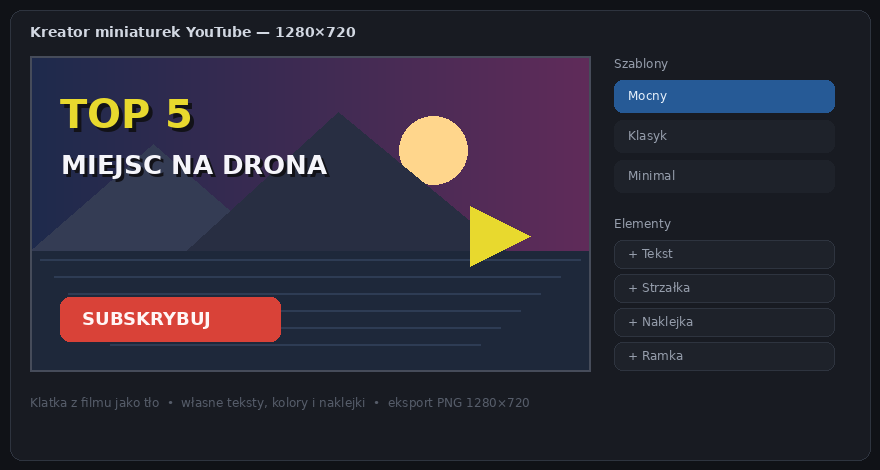 REC
RECFrom edit to thumbnail — in one app
Finish the edit and make a YouTube thumbnail from any frame right away. Templates, bold text, arrows and stickers — a ready 1280×720 PNG in minutes.
- Templates: dozens of ready-made designs — moto, lifestyle, vlog, simple and bold — with interesting fonts included
- A frame from the video as background with one click
- Layers: text, shapes, images from files, vignettes and frames
A small app, concrete reasons
Privacy with no asterisk
All editing, previewing and exporting happens on your computer. No account, no uploads to any server. The internet is needed only to check whether a new version is available — nothing else ever leaves your PC.
Zero tokens, zero subscription
Background removal, motion tracking, face censoring, old-footage refresh — everything runs on your own computer. No minutes to buy, no keys to paste, no server that disappears one day. A year from now it works exactly as it does today.
Simple, but not primitive
An interface familiar to anyone who has seen CapCut or DaVinci — with keyframes, color curves, masks, stabilization and motion tracking underneath when you need them. In English, Polish and Spanish.
Regular updates
From the first builds to the current 0.27.0 we added widgets with a speedometer read from the video and a magnifier, hand-drawn frames, camera sync by sound, faster export of long recordings, DVD import, old-footage refresh, AV1 export, audio effects, emergency save and more precise background removal. The app checks for new versions itself.
I bet on trust
The app is free. If a paid edition ever appears in the future, it will be a one-time payment — no subscription. I guarantee that, because I don't want anyone to feel cheated. And if the app already helps you today, you can buy the author a coffee.
Subtle cinematic looks
Filters designed to make footage look like film, not like Instagram: Cinema, Vintage, Noir, Golden hour, Pastel, Old photo. Strength on a slider — from barely perceptible to bold. Got your own LUTs? The app loads .cube files. Plus film grain, vignette, light leaks and fog.
New in version 0.27.0
- Magnifier A new widget zooms into part of the frame or just circles it, with a label and an arrow. Show a serial number, a road sign or a detail in the background.
- Frames and new stickers 18 frames, including hand-drawn ones: marker circle, highlighter, strike-through. They draw themselves on screen. Plus 20 new stickers.
- Sync cameras by sound Filming with two cameras? Select the clips, and one clap at the start is enough for the app to line them up.
- Your own shortcuts and a menu Assign your own keys to commands. The ribbon can collapse into a plain menu (Ctrl+F1) for a bigger preview.
- Colours with transparency A new colour picker: opacity, an eyedropper and recent colours. Font colour is now also a wide bar.
- Sound without clipping Normalization measures exactly that clip, and a limiter in export keeps the sound from clipping.
RECThe app will keep growing — together with you
MySimpleVideo is built on trust and on sharing good things. You get the full app for free — no account, no subscription, no catch. I trust that if it helps you, you will recommend it, share an idea or report a bug. Good things come back — that is why there will be gifts for users.
Gift packs
RegularlyNew thumbnail templates, text styles, transitions and stickers arrive with updates — at no extra cost.
More MySimpleApps tools
PlannedSimple, lightweight tools in the same spirit: they run on your computer, with no account and no cloud. MySimpleVideo users will hear about them first.
New editing features
In progressThe app gets new things every few weeks — many changes come straight from your messages.
Video tutorials
PlannedShort videos on the YouTube channel: step by step, how to quickly make a great video and thumbnail.
Your idea on the list
Always openTell me what you are missing — the most requested ideas go on this list and into the next versions.
A promise that will not change
For goodNo subscription, no cloud, no selling of data. Keys already issued will keep working.
Plans may change — I will post every update here and on the website. 💡 Share an idea
Start editing in minutes
The app is free. It needs a free key to start — enter your e-mail next to the download and it arrives in a minute.
1. Download the app v0.27.0
Windows 10 and 11 (64-bit). Run the installer and you're done — no toolbars, no bundled software, no account to create.
Download for Windows🔑 After installing, the app asks for a free key — get it right here in 10 seconds.
2. Get your free key
Leave your e-mail and the key arrives right away. Paste it into the activation window and you are done — the full app, free of charge.
The app is free. The coffee — optional.
I develop MySimpleVideo in my spare time. If it saved you time or a subscription fee, you can chip in — every contribution is a real motivation for the next release.